|
|
Joined: Apr 2015
Posts: 608
Member
|
|
Member
Joined: Apr 2015
Posts: 608 |
Howdy ya'll ! My 1st day here. I'm use to the posts being added immediately, to the thread. That's obviously not how it works here. So, after I enter the numbers I see at the bottom of the page, then hit submit, what else do I need to do to get it posted to the thread. Or, maybe the question should be, about how long will I have to wait before it is posted ? Please excuse the newbie questions. But, if I don't ask, how will I know ? THANKS ! 
|
|
|
|
|
Joined: Feb 2004
Posts: 1,480
Member
|
|
Member
Joined: Feb 2004
Posts: 1,480 |
Welcome to the board.
My New Topics show up right away.
|
|
|
|
|
Joined: Dec 2007
Posts: 10,337 Likes: 3
Premium Member
|
|
Premium Member
Joined: Dec 2007
Posts: 10,337 Likes: 3 |
Posts should occur within a couple of seconds. Is that not what you are experiencing?
I used to be indecisive. Now I'm not sure. I feel like I am diagonally parked in a parallel universe. 1968 400 convertible (Scarlet) 1976 T/A - 455 LE (No Burt) 1976 T/A New baby, starting full restoration. 1968 350 - 4 speed 'vert - 400 clone (the Beast!) 1968 350 convertible - Wife's car now- 400 clone (Aleutian Blue) (Blue Angel) 2008 Durango - DD 2008 GXP - New one from NH is AWESOME! 2017 Durango Citadel - Modern is nice! HEMI is amazing! 1998 Silverado Z71 - Father-daughter project 1968 400 coupe - R/A clone (Blue Pearl) (sold) 1967 326 convertible - Sold  1980 T/A SE Bandit - Sold
|
|
|
|
|
Joined: Apr 2015
Posts: 608
Member
|
|
Member
Joined: Apr 2015
Posts: 608 |
Posts should occur within a couple of seconds. Is that not what you are experiencing?
No, the post just disappeared completely. But I just retyped it, and when I hit submit, it did post instantly. So, maybe I made some sort of boo-boo, the 1st time. I'll try to remember to always copy the post, before submitting. Then if it don't post for some reason, I can paste it, and submit again. Anyhow, thanks for the replies ! Lookin forward to talkin Pontiac stuff with ya'll ! Just thought I'd add an update to this post. Today, one of my posts that had disappeared, suddenly reappeared. 
Last edited by oldskool; 04/23/15 08:17 AM.
|
|
|
|
|
Joined: Apr 2015
Posts: 608
Member
|
|
Member
Joined: Apr 2015
Posts: 608 |
OK, I need some more newbie help please. I see that some guys have pics of their cars on the bottom of their posts. I have plenty of pics on my computer and Photo Bucket. So how exactly do I go about getting some of my pics to show up on my posts ? I don't see many other pics on posts. Is there a way to post pics of something you mentioned in a post, other than just posting a link to it on Photo Bucket ? Sorry for these simple questions. But this site seems to work differently than any other site I've posted on. I tried to find the info I need, on old threads. But some of these were started several years ago. I figure just asking someone who knows, will be much easier. Thanks in advance for the help !
|
|
|
|
|
Joined: Feb 2013
Posts: 3,220
Senior Member
|
|
Senior Member
Joined: Feb 2013
Posts: 3,220 |
How to use file manager:
If new topic, click on NEW TOPIC and skip to Click on File Manager step below
If replying to message in a topic, in Reply box, click on the switch to Full Reply Screen button
Click on File Manager
Click on Choose File
Select your image file
Enter File Caption if needed
Click on Add File
Repeat uploading file until all images uploaded prior to clicking on Done Adding Files (Can always go back and add more even during editing post
Click on Done Adding Files
Finish your post/reply
To add items in your signiture:
Under MY Stuff on the top menu click on edit profile
Mid way down you will see a signiture block you can add UBBCODE
If you have a image hosted with flickr or some other image hosting service you can select share image and choose the UBBCODE and then paste in the signiture block there.
|
|
|
|
|
Joined: Apr 2015
Posts: 608
Member
|
|
Member
Joined: Apr 2015
Posts: 608 |
Thanks HaroldB ! Right now I don't have a clue what you're talkin about. But later on, I'll follow your instructions, step by step, and see if I can get the hang of it. OK, I gave it a try. Here's where I am now. I posted a link to a Photobucket pic, to show up on my posts. I put it between the [Img][/img]. It showed up as a link to my entire Photobucket library. But no pic appeared on the post. So, next, I tried to put a pic in a reply. But I could not find anything labeled "File Manager", as you described it, needed to upload pics, either from my computer or from Photobucket. So I obviously don't understand how to get there from here. More detailed, and VERY SIMPLE instructions needed. Sorry ! But 5 years ago I was COMPLETELY computer illiterate, and am obviously not too far from that now. Never mind, I got it. All you have to do is just copy and paste the Photobucket link to your pic--the link that already has the [img][/img] included. Nothing could be simpler than that. But then I reckin a lot of things are simple if you already know how to do 'em.
Last edited by oldskool; 04/24/15 02:58 AM.
|
|
|
|
|
Joined: Apr 2015
Posts: 608
Member
|
|
Member
Joined: Apr 2015
Posts: 608 |
Well, I spoke too quick. The Photobucket link produced a pic in the reply to a thread. But when I tried the same thing for the signature pic, it just shows up as a link to my entire PB library, or at least that album. And I have not seen anything labeled UBBCODE on Photobucket. So, I'm back to square one.
So, my question is still how to get a pic (not just a link) to show up in all my posts. Any help will be welcome. Thanks !
Last edited by oldskool; 04/23/15 07:53 PM.
|
|
|
|
|
Joined: Jul 2014
Posts: 94
Member
|
|
Member
Joined: Jul 2014
Posts: 94 |
This forum is the most complicated forums I use.... but I guess after you get to a certain number of posts you dont need to put that captcha code
|
|
|
|
|
Joined: Apr 2015
Posts: 608
Member
|
|
Member
Joined: Apr 2015
Posts: 608 |
"...Click on File Manager..." OK, here I am on the full screen reply page and I don't see anything labeled "File Manager". So, could someone please tell me EXACTLY where it's located, or how to make it pop up or whatever it takes to get pics from my computer to a post ???  I reckin this is just another one of my "Computer Dummy" questions.  So, ya'll bear with me please. I'll get the hang of it, eventually. Hey, believe it or not, I've come a LONG way. 5 years ago, all I knew about a computer was that it had a screen, a keyboard and a mouse. Didn't even know how to turn one on, much less how to get on the net and log on to a website.  But, thanks to a VERY patient computer guy at our local library, I learned what little I know now. I reckin that sometimes in life, when you really need some help, God will send just the right person across your path. He did it for me, and for that, I am VERY thankful. Thanks to all you guys (& gals) for all the help, in learning about this site !
Last edited by oldskool; 04/24/15 09:51 AM.
|
|
|
|
|
Joined: Jan 2002
Posts: 7,719
Power Member
|
|
Power Member
Joined: Jan 2002
Posts: 7,719 |
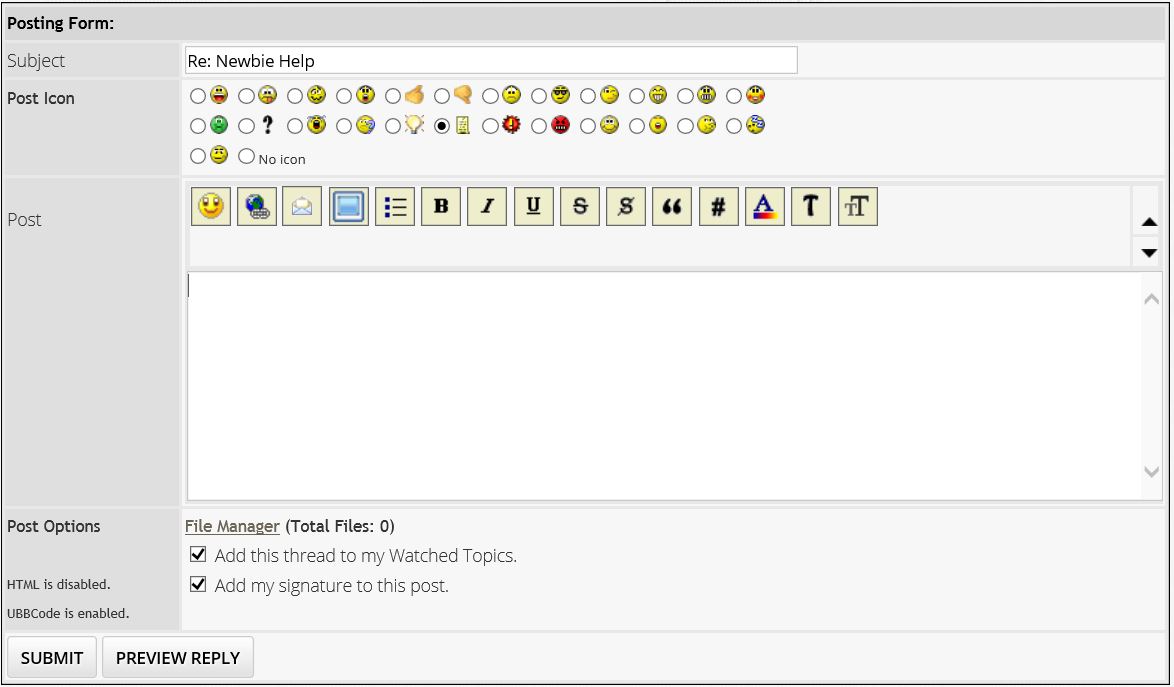
File manager should appear in bold underlined print directly below the lower left corner of the text window. It should appear as:
File Manager (Total Files:0)
Mark as Edited? Reason for edit:
Add signature to this post
We have heard that certain browsers do not show the above.
PS: I believe "Add signature to this post" is where you put a photo at the bottom of every posting.
2012 Mustang Boss 302 #1918, Competition Orange. FGF replacement
2006 Mustang V6 Pony, Vista Blue. Factory ordered.
2019 BMW X3 (Titled to the wife, but I'm always driving it for her. So I'm claiming it)
Old projects, gone but not forgotten:
1967 FB 400, original CA car. After 22 years of work, trashed by the guy who was supposed to paint it. I had to sell it.
1980 Turbo Trans Am
1970 Mustang fastback, 351C 4Bbl, auto
1988 Mustang GT, 5 speed
1983 F-150 4x4, built 302
1994 Chevy K2500 HD 4x4, 454 TBI
|
|
|
|
|
Joined: Apr 2015
Posts: 608
Member
|
|
Member
Joined: Apr 2015
Posts: 608 |
"...We have heard that certain browsers do not show the above..." Now, we may be getting somewhere ! Maybe this explains why I am not seeing what some say I should be seeing. I am using Google Chrome. I am going to switch over to Internet Explorer now, and see if the "File Manager" appears. OK, I tried IE. I logged in, but when I went to the forums, it logged me out, 3 times in a row ! So, I Googled internet browsers. It showed that the #1 browser is Google Chrome. And the #2 browser is Firefox. So, I downloaded Firefox, which is what I'm using now. But, I still do not see any "File Manager", and the PB link to my signature pic, shows up as a link only and not a pic. So, I am obviously either doing something wrong, or using the wrong tools. So, what browser are some of ya'll using, that shows the File Manager and will download an actual picture to your sig ? Any and all help will be greatly appreciated. Now I'm using the Safari browser. Still no sign of a "File Manager". That's 4 of the top Browsers I've tried. There's got to be somebody on this site that can help me figure out how to use the "File Manager"--right ? Here's what I see, where the "File Manager" is supposed to be: Post Options HTML is disabled. UBBCode is enabled. Instead of this: File Manager (Total Files:0)
Last edited by oldskool; 04/24/15 08:49 PM.
|
|
|
|
|
Joined: Feb 2013
Posts: 3,220
Senior Member
|
|
Senior Member
Joined: Feb 2013
Posts: 3,220 |
I am using IE. Sometimes it does log you off. I have found to close all your browsers. Open up IE and then go straight to the forum and log in. If you have multiple tabs open and you try from any other tab but the first one, that is an issue to.
Here is a screen shot of what you should see.
|
|
|
|
|
Joined: Jan 2002
Posts: 7,719
Power Member
|
|
Power Member
Joined: Jan 2002
Posts: 7,719 |
I am using Firefox at home with no problems. Same for IE at work.
Are you using an Apple product?
2012 Mustang Boss 302 #1918, Competition Orange. FGF replacement
2006 Mustang V6 Pony, Vista Blue. Factory ordered.
2019 BMW X3 (Titled to the wife, but I'm always driving it for her. So I'm claiming it)
Old projects, gone but not forgotten:
1967 FB 400, original CA car. After 22 years of work, trashed by the guy who was supposed to paint it. I had to sell it.
1980 Turbo Trans Am
1970 Mustang fastback, 351C 4Bbl, auto
1988 Mustang GT, 5 speed
1983 F-150 4x4, built 302
1994 Chevy K2500 HD 4x4, 454 TBI
|
|
|
|
|
Joined: Apr 2015
Posts: 608
Member
|
|
Member
Joined: Apr 2015
Posts: 608 |
No, I am using a HP laptop. And I have never seen the "File Manager" line under the box (which HaroldB posted) before. I'm using Chrome now. I'll switch over to IE now, and try it. Nope. I logged in with IE, and as soon as I clicked on the thread, it logged me out. I'm using Firefox now. But no "File Manager" appears on the full screen reply. So, I'll try Safari one more time. Nope. Still no "File Manager" with Safari. OK, that's all the time I'm gonna spend on it. THANKS for all the help ! I'll just enjoy the site, without "File Manager". No problem.
Last edited by oldskool; 04/27/15 05:32 PM.
|
|
|
|
|
Joined: Aug 2002
Posts: 7,495 Likes: 1
Premium Member
|
|
Premium Member
Joined: Aug 2002
Posts: 7,495 Likes: 1 |
Maybe it's some firewall thing. Some business servers don't allow posting or looking at pics so there must be some kind of filters that don't allow them.
|
|
|
|
|
Joined: Feb 2013
Posts: 3,220
Senior Member
|
|
Senior Member
Joined: Feb 2013
Posts: 3,220 |
|
|
|
|
|
Joined: Apr 2000
Posts: 1,524 Likes: 3
Site Admn
|
|
Site Admn
Joined: Apr 2000
Posts: 1,524 Likes: 3 |
You should now have ability to use images in your signature. The File Manager should also be available.
I will need to take a look at the forums permissions and group permissions and update based on feedback here. Permissions and groups are used in the backend to limit access to certain features and way to thwart spammers and hackers from gaining access to parts you do not want them to have access.
For example, I have a group set up for new members who have not had a post approved and another group until you hit another level. These groups have limited access and posts do not appear right away. This is what you were seeing. There give and take issues when limiting access to stop spammers. Do you want to impact experience of newbies to restrict spammers.
In this case, it's negative experience and I'm going to update permissions to reflect change so not to have negative impact on experience.
|
|
|
|
|
Joined: Apr 2015
Posts: 608
Member
|
|
Member
Joined: Apr 2015
Posts: 608 |
OK, I'll give it a try. Yes, the File Manager pops right up ! --using Chrome--I'll try IE. OK, IE still logs me out, as soon as I click on a thread. So, I'm using Firefox now. And the File Manager is working. I'll go ahead and switch to Safari, while I'm at it. I'm now using Safari, and the file manager is on. Also I no longer have to enter the weird numbers and letters, in order to post. So, now I'll try to post a pic from my laptop, using the File Manager. OK, now it works perfectly. That's MUCH better ! THANKS ! I'll try the sig pic later.
.JPG "100_1867 (2).JPG
Views: 230
Size: 90.3 KB") TJ's '68 Bracket Bird in '79 TJ's '68 Bracket Bird in '79
Last edited by oldskool; 04/30/15 03:30 PM.
|
|
|
|
|
Joined: Apr 2000
Posts: 1,524 Likes: 3
Site Admn
|
|
Site Admn
Joined: Apr 2000
Posts: 1,524 Likes: 3 |
That's great. Again, thank you as I was not aware of how much a pita this was with the settings I had set up.
|
|
|
|
Forums57
Topics35,534
Posts298,850
Members8,861
| |
Most Online19,810
Feb 1st, 2026
|
|
|
2 members (Geoff, Jimc2002),
469
guests, and
119
robots. |
|
Key:
Admin,
Global Mod,
Mod
|
|
|
There are no members with birthdays on this day. |
|
|
|